 Real-Time Media Conductor
Build · Get started
Build a TypeScript client
Share a RoomClient across your application, give each view a subscription, and make ownership explicit.
The SDK keeps transport mechanics out of your views. Your application should own one RoomClient for a room and participant credential, then hand that object to components that create their own subscriptions.
New to the model? Read multiplexing for connection ownership, subscriptions for view lifetime, and cursors for recovery.
Use the workspace package
Inside RMC, npm ci links the private @rmc/client workspace and npm run build --workspace @rmc/client produces its dist files. See the SDK package configuration for its exports and build scripts.
For a separate local project next to RMC, build the SDK first, then add a file dependency pointing to it:
{
  "dependencies": {
    "@rmc/client": "file:../realtime-media-conductor/sdk/typescript"
  }
}
Run your package manager's install in that project. The relative path is from its package.json; adjust it to your checkout layout. The package exports ESM and declarations from dist, so a missing SDK build causes resolution errors. This is a local development arrangement, not a published package distribution workflow.
The default client uses global fetch and WebSocket. The repository's supported Node version provides both. You can inject them using new RmcClient(baseUrl, {fetch, webSocket}) for another runtime or a test. See client.ts.
Give one owner the room handle
import {RmcClient} from "@rmc/client";

// These credentials came from your application's authenticated backend.
const client = new RmcClient(session.baseUrl);
const room = client.room(session.roomId, session.token);
Share room through your application's session owner or context. Do not call client.room(...) independently in every component: each call creates its own connection manager. A ChannelClient is a lightweight handle derived from this same room.
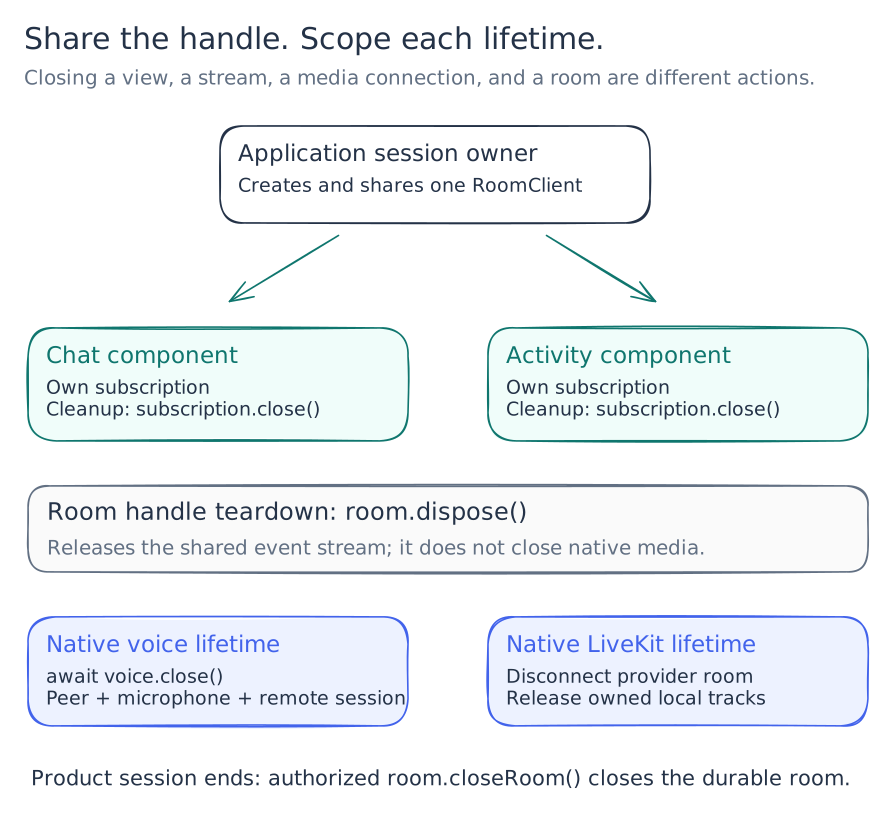
| Resource | Created by | Released by | Scope |
|---|---|---|---|
| Subscription | room.subscribe() or channel.subscribe() |
subscription.close() or its AbortSignal |
One view or consumer |
| Multiplexed stream | First subscription on a room handle | Final subscription closes, or room.dispose() |
Shared RoomClient |
| Voice connection and captured microphone | room.connectVoice() |
await voice.close() or its lifetime signal |
Native voice session |
| LiveKit connection / local tracks | Your native media integration | Native disconnect and track cleanup | Media session |
| Durable remote room | Backend createRoom() |
Authorized await room.closeRoom() |
Product session |
room.dispose() permanently closes that handle's subscription stream. It does not close the remote room or the separately owned voice and LiveKit resources. It also does not disable the handle's HTTP methods. Create a new handle when you need a new subscription lifetime.
Subscribe from a React view
A React effect owns its subscription and closes it on cleanup. This excerpt assumes a shared room and a stable, application-owned applyMessage callback:
useEffect(() => {
  const subscription = room.channel("chat").subscribe({
    onEvent: applyMessage,
  });
  return () => subscription.close();
}, [room, applyMessage]);
applyMessage must validate payloads, deduplicate by event ID, and ignore stale
updates after the view ends. The complete component also handles connection state
and errors.
Download ChatFeed.tsx. Mount it with <ChatFeed room={room} /> in the session view. Keep the room object stable while that room and participant identity remain active.
React development checks can mount and clean up effects more than once. Closing the child subscription is safe; disposing the parent room handle from the child would make the next subscription fail. The session owner should create and dispose its handle within the same lifecycle scope, and create a fresh one when that scope restarts.
Publish with an explicit payload contract
type Message = {text: string};
const text = input.trim();
if (text) {
  await room.channel("chat").publish<Message>(
    "text.message.committed", {text},
  );
}
Here input is your application input value. The channel helper creates a client event ID if you omit one. For a retryable send, create that ID outside the retry attempt and reuse it; see the recipe.
room.publish() takes camelCase input keys such as clientEventId and channelId. Received envelopes and resource types follow the wire format, including room_id, channel_id, occurred_at, and participant_ids. DelegationRequest also uses snake_case. Use the exported types rather than applying a blanket case conversion.
Handle connection state separately from content
subscribe() returns a handle synchronously; it does not wait for authentication or replay. onStateChange reports transport/subscription lifecycle. onEvent delivers facts. A browser can show historical content while the connection is reconnecting.
The SDK catches callback failures, closes the affected subscription, and reports through onError. Your error UI should offer an explicit retry for a closed consumer, using its last processed cursor. Avoid an immediate infinite resubscribe loop: a deterministic payload or reducer bug would fail on the same record again.
Connect a browser to the API
Use a same-origin reverse proxy for a deployed UI, or configure exact permitted REST origins when embedding the HTTP server. httpapi.WithAllowedOrigins(...) enables REST CORS. The demo binary reads RMC_ALLOWED_ORIGINS; the standalone rmc-server entry point does not read that environment variable at this revision.
WebSocket origin checks are separate: the current handler permits same-host connections and explicit localhost/127.0.0.1 origin patterns. A custom cross-origin deployment needs an intentional transport change; setting REST CORS alone is insufficient. Do not place room tokens in the stream URL to work around browser header limitations. The SDK authenticates in the first WebSocket frame.
See the server entry point, demo wiring, and HTTP origin handling.